
The Setup of the testing environment:
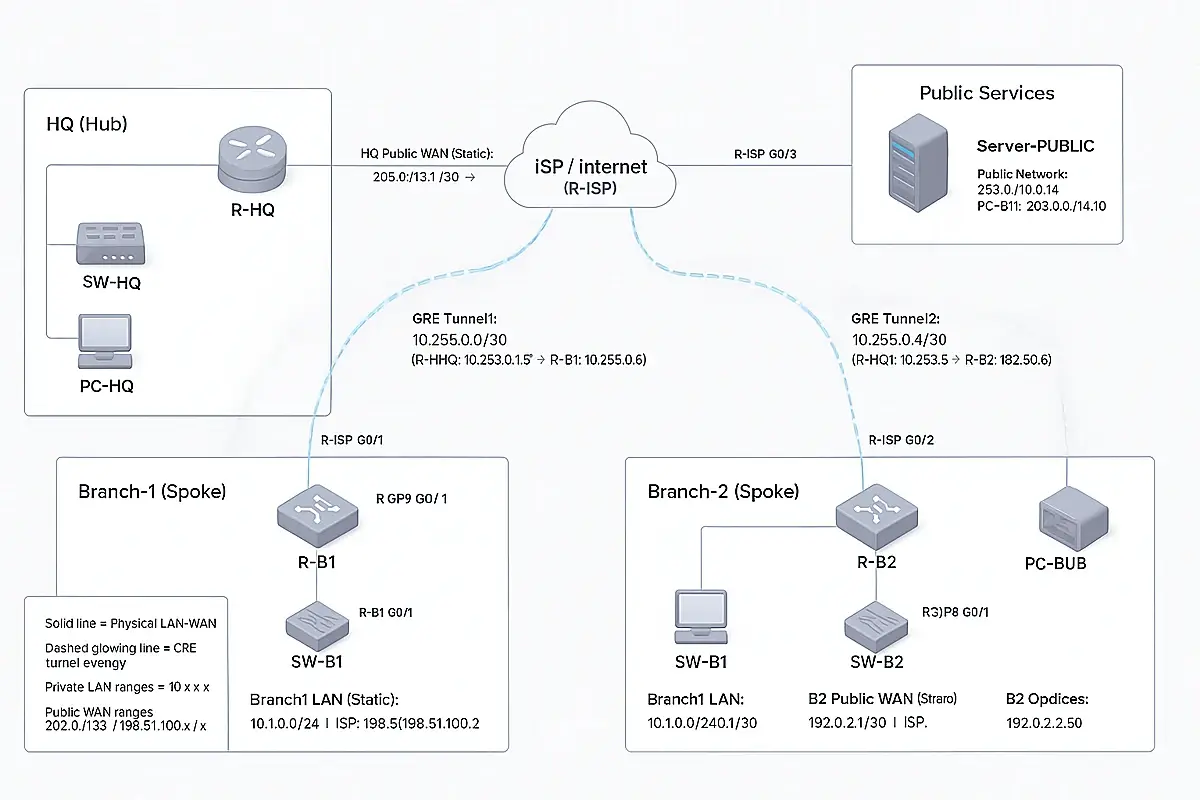
قصة شبكة تتحوّل من فوضى إلى منظومة قوية لا تنهار
ربط HQ مع الفروع بتصميم Hub-and-Spoke (اتصال + أمان)
1) هدف التصميم
- ربط كل الفروع بالـHQ بحيث الشركة تشتغل كأنها شبكة واحدة.
- جعل الـHQ هو مركز التحكم (Hub).
- جعل الاتصال آمن + ثابت + سهل التوسّع.
- سهولة إضافة فروع جديدة بنفس القالب.
2) فكرة Hub-and-Spoke
- HQ = Hub (المخ)
- الفروع = Spokes
- كل فرع يعمل Tunnel واحد إلى HQ.
- الفروع لا تتواصل مع بعضها افتراضيًا إلا لو HQ سمح.
- المميزات:
- تحكم مركزي + رؤية أوضح
- تعقيد أقل من Full Mesh
- تطبيق سياسات وأمان بسهولة
3) المرحلة صفر: فحص قبل أي VPN
الهدف: التأكد أن الـWAN والـRouting ثابتين.
أوامر على كل راوتر/فايروول:
show ip interface brief
show ip route
ping <ISP-next-hop>
النتيجة المطلوبة:
- واجهة الـWAN تكون up/up
- وجود default route
- الـISP next-hop يرد على الـPing
4) المرحلة الأولى: بناء الـOverlay (GRE Hub-and-Spoke)
الهدف: إنشاء ربط مرن يجعل الـRouting بين المواقع بسيط.
4.1 على HQ (Hub) — إنشاء GRE Tunnels (قالب)
Tunnel للفرع 1 (مثال):
interface tunnel1
ip address <HQ-Tunnel1-IP> <mask>
tunnel source <HQ-WAN-Interface>
tunnel destination <Branch1-Public-IP>
Tunnel للفرع 2 (مثال):
interface tunnel2
ip address <HQ-Tunnel2-IP> <mask>
tunnel source <HQ-WAN-Interface>
tunnel destination <Branch2-Public-IP>
وتكرر نفس الفكرة لأي فروع إضافية.
4.2 على الفرع (Spoke) — Tunnel رجوع إلى HQ (قالب)
مثال فرع 1:
interface tunnel1
ip address <Branch1-Tunnel-IP> <mask>
tunnel source <Branch1-WAN-Interface>
tunnel destination <HQ-Public-IP>
4.3 Routing عبر الـGRE (قالب)
على HQ (Routes لشبكات الفروع):
ip route <Branch1-LAN-Subnet> <mask> tunnel1
ip route <Branch2-LAN-Subnet> <mask> tunnel2
على كل فرع (Route لشبكة HQ):
ip route <HQ-LAN-Subnet> <mask> <HQ-Tunnel-IP>
4.4 التحقق (GRE + Routing)
على HQ:
show interface tunnel1
show interface tunnel2
المفروض يظهر:
- “Tunnel is up, line protocol is up”
اختبارات Ping:
- Ping من PC الفرع إلى PC الـHQ
- Ping من HQ إلى الفرع
5) المرحلة الثانية: تأمين الاتصال (تشفير IPsec)
ملاحظة مهمة:
GRE وحده غير مُشفر. في الشبكات الحقيقية نأمّنه باستخدام GRE over IPsec.
5.1 إعدادات أمان مقترحة
Phase 1 (IKE)
- AES-256
- SHA-256
- DH Group 14
- Lifetime 28800 ثانية
- PSK قوي أو Certificates
Phase 2 (IPsec)
- AES-256 + SHA-256
- PFS Group 14
- Lifetime 3600 ثانية
الثبات
- تفعيل DPD / Keepalive
5.2 خطوات التنفيذ (بدون التزام بمنتج معين)
- تحديد الترافيك الذي سيتم تشفيره (عادة GRE بين الـPublic IPs)
- ضبط سياسة Phase 1
- ضبط سياسة Phase 2
- ربط السياسات بواجهة الـWAN
- تكرار لكل فرع
5.3 التحقق
- IKE established
- IPsec SAs active
- Counters بتزيد
- LAN-to-LAN شغال
6) المرحلة الثالثة: تقليل سطح الهجوم (قفل الـWAN)
الهدف: السماح فقط بترافيك الـVPN من الـPeers المعروفين.
قائمة السماح النموذجية:
- UDP 500 (IKE)
- UDP 4500 (NAT-T لو مستخدم)
- ESP (Protocol 50)
- GRE (Protocol 47 لو موجود)
وأي شيء غير ذلك يتم منعه.
7) المرحلة الرابعة: الـHQ هو المتحكم
- لو سياسة الشركة: الفروع لا تتواصل مع بعضها
- نطبق ذلك عبر الـRouting والـFirewall:
- السماح للفروع بخدمات HQ فقط
- منع Branch ↔ Branch إلا بتصريح
- نطبق ذلك عبر الـRouting والـFirewall:
You already have:
- WAN IPs working
- GRE tunnels up
- Routing between LANs working
Now we will:
- Encrypt GRE with IPsec (GRE over IPsec)
- (Optional) Lock down WAN inbound with ACL so only VPN traffic is allowed
- Verify with show crypto commands
Step 1 — Verify GRE is UP (quick check)
Run on R-HQ:
show interface tunnel1
show interface tunnel2
Expected:
- Tunnel is up, line protocol is up
Step 2 — Apply IPsec on HQ (R-HQ) to protect both GRE tunnels
✅ Copy/paste on R-HQ:
enable
conf t
! =========================================================
! A) Interesting traffic: encrypt GRE between PUBLIC WAN IPs
! =========================================================
ip access-list extended ACL-GRE-HQ-B1
permit gre host 203.0.113.1 host 198.51.100.1
ip access-list extended ACL-GRE-HQ-B2
permit gre host 203.0.113.1 host 192.0.2.1
! =========================================================
! B) IKE Phase 1 (IKEv1) – Strong settings
! =========================================================
crypto isakmp policy 10
encr aes 256
hash sha256
authentication pre-share
group 14
lifetime 28800
! If Packet Tracer rejects sha256, use SHA instead:
! crypto isakmp policy 10
! encr aes 256
! hash sha
! authentication pre-share
! group 14
! lifetime 28800
! DPD / Keepalive (stability)
crypto isakmp keepalive 10 periodic
! Pre-shared key per branch peer
crypto isakmp key vpnHQ123 address 198.51.100.1
crypto isakmp key vpnHQ123 address 192.0.2.1
! =========================================================
! C) IKE Phase 2 (IPsec)
! =========================================================
crypto ipsec transform-set TS-GRE esp-aes 256 esp-sha-hmac
mode tunnel
! =========================================================
! D) Crypto Map – One entry per branch
! =========================================================
crypto map CMAP-IPSEC 10 ipsec-isakmp
description GRE_over_IPsec_to_Branch1
set peer 198.51.100.1
set transform-set TS-GRE
set pfs group14
set security-association lifetime seconds 3600
match address ACL-GRE-HQ-B1
crypto map CMAP-IPSEC 20 ipsec-isakmp
description GRE_over_IPsec_to_Branch2
set peer 192.0.2.1
set transform-set TS-GRE
set pfs group14
set security-association lifetime seconds 3600
match address ACL-GRE-HQ-B2
! =========================================================
! E) Apply IPsec to HQ WAN interface (WAN = g0/1 in your doc)
! =========================================================
interface g0/1
crypto map CMAP-IPSEC
end
wr
Step 3 — Apply IPsec on Branch1 (R-B1)
✅ Copy/paste on R-B1:
enable
conf t
! Encrypt GRE between Branch1 WAN and HQ WAN
ip access-list extended ACL-GRE-B1-HQ
permit gre host 198.51.100.1 host 203.0.113.1
crypto isakmp policy 10
encr aes 256
hash sha256
authentication pre-share
group 14
lifetime 28800
! If sha256 is not supported in your PT IOS, use SHA:
! crypto isakmp policy 10
! encr aes 256
! hash sha
! authentication pre-share
! group 14
! lifetime 28800
crypto isakmp keepalive 10 periodic
crypto isakmp key vpnHQ123 address 203.0.113.1
crypto ipsec transform-set TS-GRE esp-aes 256 esp-sha-hmac
mode tunnel
crypto map CMAP-IPSEC 10 ipsec-isakmp
description GRE_over_IPsec_to_HQ
set peer 203.0.113.1
set transform-set TS-GRE
set pfs group14
set security-association lifetime seconds 3600
match address ACL-GRE-B1-HQ
interface g0/1
crypto map CMAP-IPSEC
end
wr
Step 4 — Apply IPsec on Branch2 (R-B2)
✅ Copy/paste on R-B2:
enable
conf t
! Encrypt GRE between Branch2 WAN and HQ WAN
ip access-list extended ACL-GRE-B2-HQ
permit gre host 192.0.2.1 host 203.0.113.1
crypto isakmp policy 10
encr aes 256
hash sha256
authentication pre-share
group 14
lifetime 28800
! If sha256 is not supported in your PT IOS, use SHA:
! crypto isakmp policy 10
! encr aes 256
! hash sha
! authentication pre-share
! group 14
! lifetime 28800
crypto isakmp keepalive 10 periodic
crypto isakmp key vpnHQ123 address 203.0.113.1
crypto ipsec transform-set TS-GRE esp-aes 256 esp-sha-hmac
mode tunnel
crypto map CMAP-IPSEC 10 ipsec-isakmp
description GRE_over_IPsec_to_HQ
set peer 203.0.113.1
set transform-set TS-GRE
set pfs group14
set security-association lifetime seconds 3600
match address ACL-GRE-B2-HQ
interface g0/1
crypto map CMAP-IPSEC
end
wr
Step 5 — Bring the VPN up (generate “interesting traffic”)
IPsec will NOT fully establish until GRE traffic starts flowing.
From PC-Branch1, ping PC-HQ:
ping 10.0.0.50
From PC-Branch2, ping PC-HQ:
ping 10.0.0.50
Do 2–3 pings if the first fails.
Step 6 — Verify IPsec is working (must check these)
On HQ (R-HQ):
show crypto isakmp sa
show crypto ipsec sa
Expected:
- ISAKMP state shows something like QM_IDLE
- IPsec SA counters (pkts encaps / decaps) increase
On Branch1 (R-B1) and Branch2 (R-B2):
show crypto isakmp sa
show crypto ipsec sa
Step 7 (Optional but recommended) — Lock down WAN inbound with ACL
This prevents random traffic from hitting your WAN interface and allows only VPN traffic from the known peers.
7.1 HQ WAN ACL (apply inbound on HQ WAN g0/1)
✅ Copy/paste on R-HQ:
enable
conf t
ip access-list extended WAN-IN
! Allow IKE from branches to HQ
permit udp host 198.51.100.1 host 203.0.113.1 eq 500
permit udp host 192.0.2.1 host 203.0.113.1 eq 500
! Allow ESP (IP protocol 50)
permit esp host 198.51.100.1 host 203.0.113.1
permit esp host 192.0.2.1 host 203.0.113.1
! Allow GRE (protocol 47) – because we run GRE over IPsec
permit gre host 198.51.100.1 host 203.0.113.1
permit gre host 192.0.2.1 host 203.0.113.1
! Optional: allow ping to WAN for testing
permit icmp any host 203.0.113.1
deny ip any any log
interface g0/1
ip access-group WAN-IN in
end
wr
7.2 Branch1 WAN ACL (inbound on Branch1 WAN g0/1)
✅ Copy/paste on R-B1:
enable
conf t
ip access-list extended WAN-IN
permit udp host 203.0.113.1 host 198.51.100.1 eq 500
permit esp host 203.0.113.1 host 198.51.100.1
permit gre host 203.0.113.1 host 198.51.100.1
permit icmp any host 198.51.100.1
deny ip any any log
interface g0/1
ip access-group WAN-IN in
end
wr
7.3 Branch2 WAN ACL (inbound on Branch2 WAN g0/1)
✅ Copy/paste on R-B2:
enable
conf t
ip access-list extended WAN-IN
permit udp host 203.0.113.1 host 192.0.2.1 eq 500
permit esp host 203.0.113.1 host 192.0.2.1
permit gre host 203.0.113.1 host 192.0.2.1
permit icmp any host 192.0.2.1
deny ip any any log
interface g0/1
ip access-group WAN-IN in
end
wr
If you still need open WAN access for other services, do not apply these ACLs or customize them.
Step 8 — Troubleshooting (fast fixes)
- A) If hash sha256 fails
Use hash sha on ALL routers (HQ + branches).
- B) If IPsec doesn’t come up
Check:
show crypto isakmp sa
show crypto ipsec sa
Then generate traffic again (ping from branch to HQ).
- C) If you applied WAN ACL and VPN stopped
Remove the ACL temporarily:
conf t
interface g0/1
no ip access-group WAN-IN in
end